Today Capture One 12 got officially released. It adds a ton of new features and if you want to buy it (Click here) you get additional 10% off using our code “AMB43R“.
Here is the official Press release:
Phase One releases Capture One 12
Redesigned and reimagined for the needs of today’s creatives, expanding for tomorrow’s solutions
COPENHAGEN, November 29, 2018: Phase One, the world’s leading manufacturer of high-end digital camera systems, today released Capture One 12, the next major milestone in the evolution of the industry’s premier RAW conversion, image editing, and asset management software. This release takes a top-down approach to streamline, modernizing, and improving the user interface to continue the program’s tradition of providing powerful features in a customizable, uniquely- configurable interface.
New masking tools and improved workflow features continue Capture One’s tradition of providing the most powerful image editing tools available, while a new plug-in ecosystem will allow third-party developers to connect their services and applications to Capture One.
Capture One 12 furthers Phase One’s commitment to providing unparalleled RAW editing, with unmatched tethering, color handling and precise editing on images captured with any of more than 500 different camera models.
Capture One 11.3 introduced support for all Fujifilm cameras and their unique sensors. Capture One 12 now enhances that support with the ability to correctly read and interpret Fujifilm’s legendary Film Simulations.
“Capture One has long been recognized as the industry standard for RAW image editing and image management,” says Jan Hyldebrandt-Larsen, VP Software Business at Phase One. “With this update, we focused on creative control — updating and improving the user interface, adding powerful new masking tools, and extending the Capture One ecosystem through plug-in support. These updates further our commitment to ensuring that Capture One continues to be the industry’s recognized leader in accuracy, performance, and customizability.”
Download Capture One 12, as well as find resources and tutorials at:
www.captureone.com/12
– > New features and tools in Capture One 12
Powerful, refined interface
Capture One 12 introduces a newly re-designed, contemporary interface, designed to make Capture One easier to use during long editing sessions and to make discovery, experimentation, and customizability easier than ever. New iconography better conveys tool functionality, and the new slider design, the spacing of the tools, and font size increase improves both the look and the usability of the program.
The result is a new environment that feels more welcoming for new users while being more customizable for power-users.
Revamped menu system
Every menu item in Capture One 12 has been evaluated, categorized, and organized according to its logical function and grouped along with associated tasks, which makes it easier to find the desired controls and settings, and brings the Mac and Windows menu options into alignment.
Luminosity masking
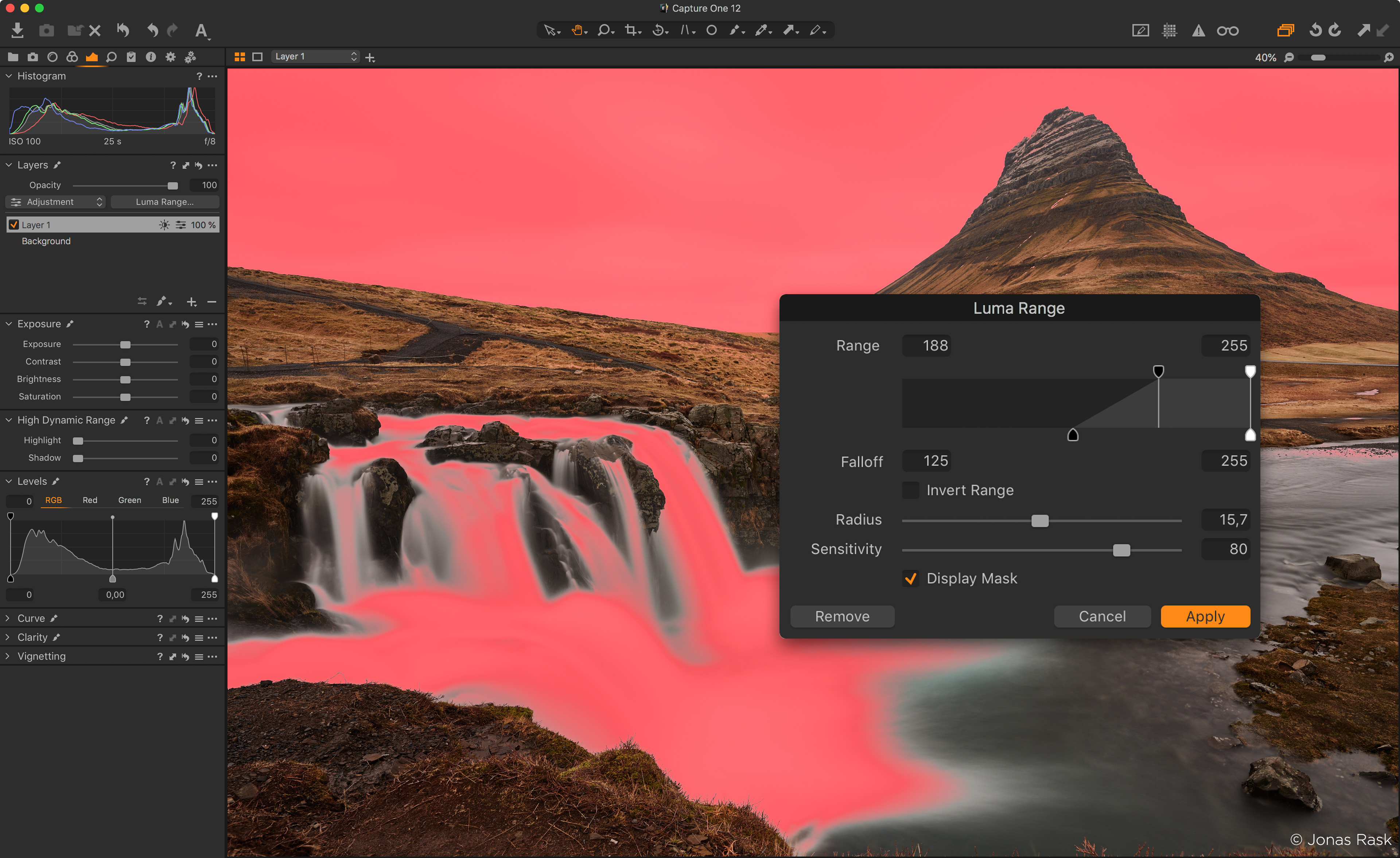
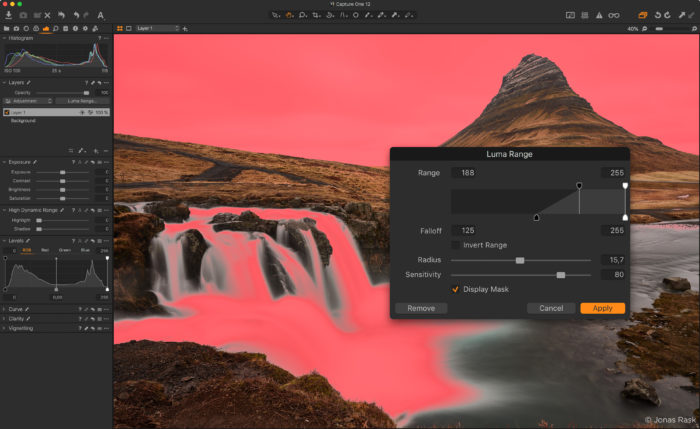
One of a trio of new masking tools, Luma Range allows users to quickly create masks based on the brightness of pixels in an image and is the most powerful luminance masking tool of its kind.
This masking technique is particularly powerful in landscapes and high-key portraits, as it allows for nearly-instantaneous masks in complex scenes based on brightness—eliminating the need to tediously paint complex masks. Once a luminance range is created and adjusted using the precision mask-adjustment tools, nearly any editing tool can be applied to the mask.
The masks created with the Luma Range tool are dynamic and can easily be tweaked and modified at any point in the workflow. Unlike a hand-drawn mask, Luma Range adjustments can be applied from one image to another, and the effect will be based on the luminance of each image. This functionality is a huge time- saver as it eliminates the need to create precision masks for each frame in a shoot.
The new Luma Range selection masks open up an incredible range of editing possibilities, from selective noise reduction to precise color grading.
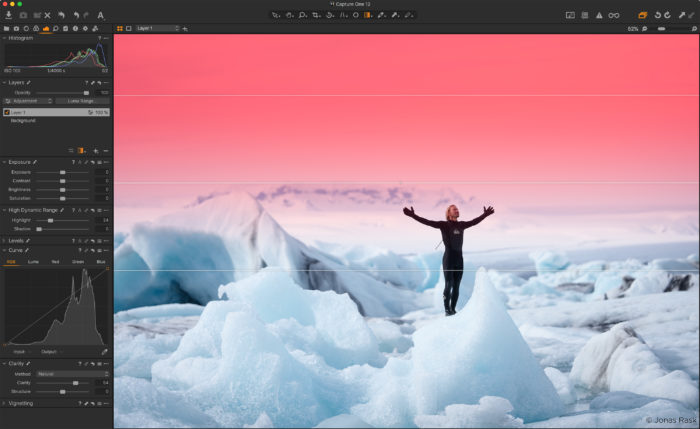
Linear Gradient Mask
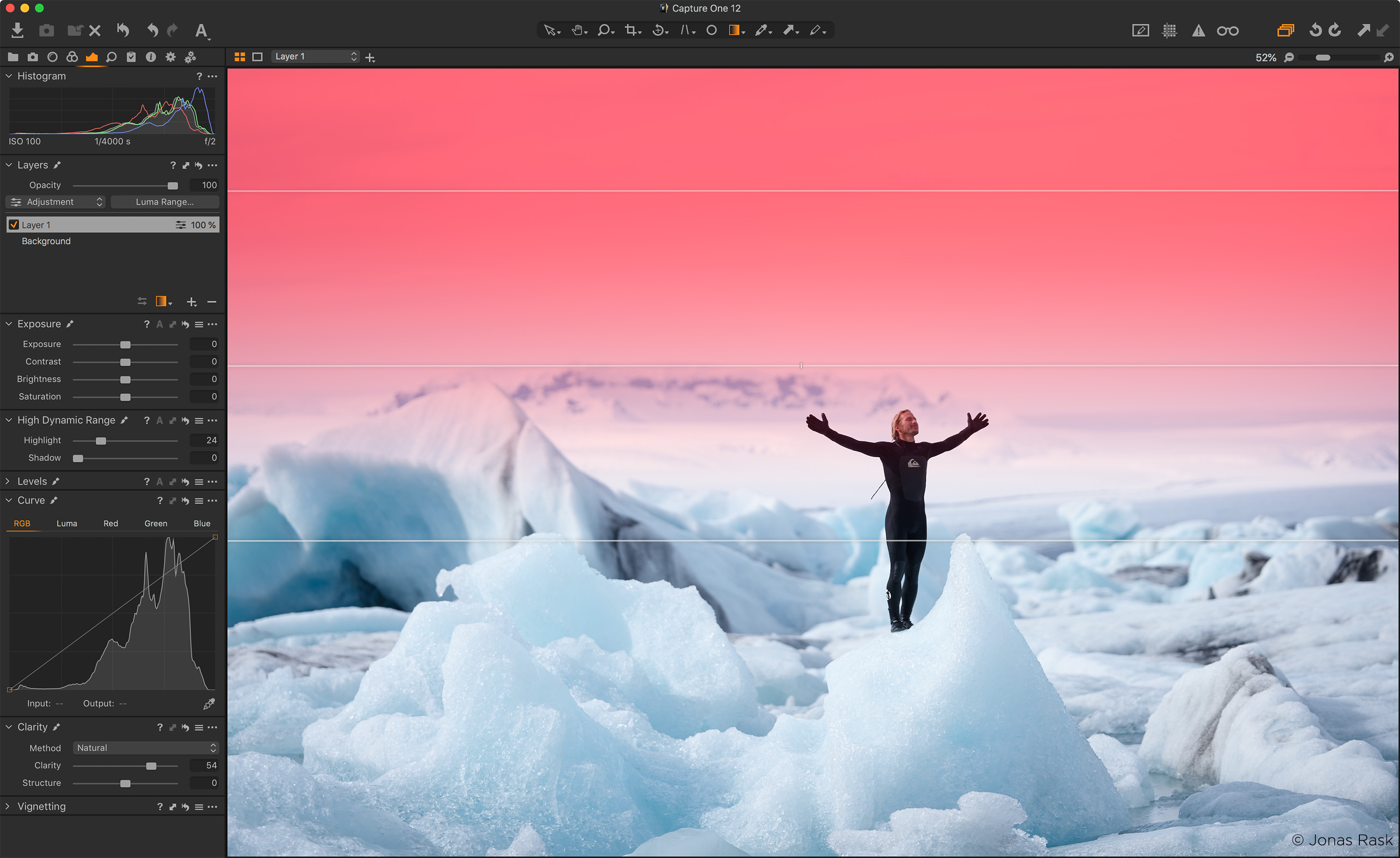
Capture One 12 takes gradient masks to the next level, allowing for editable, moveable, rotatable—and best of all—asymmetric gradient masks. Using a brand- new Parametric Masking Engine, Capture One allows for adjustments in the size, shape, and symmetry of the masks with simple mouse clicks and key presses, truly redefining the possibilities of linear gradients in Capture One. Rotate, feather and adjust a mask with a precision never before possible.
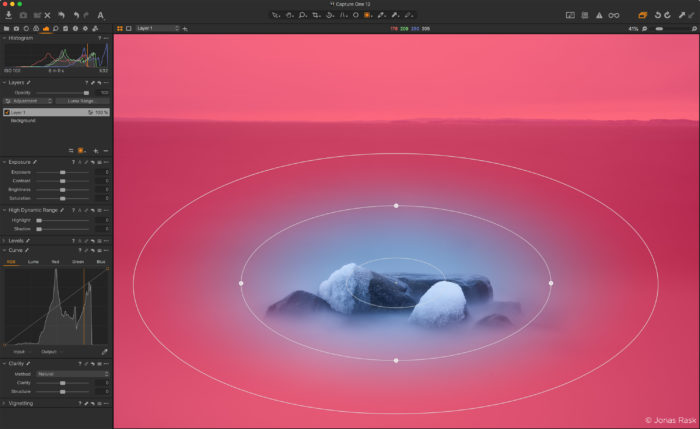
Radial Gradient Mask
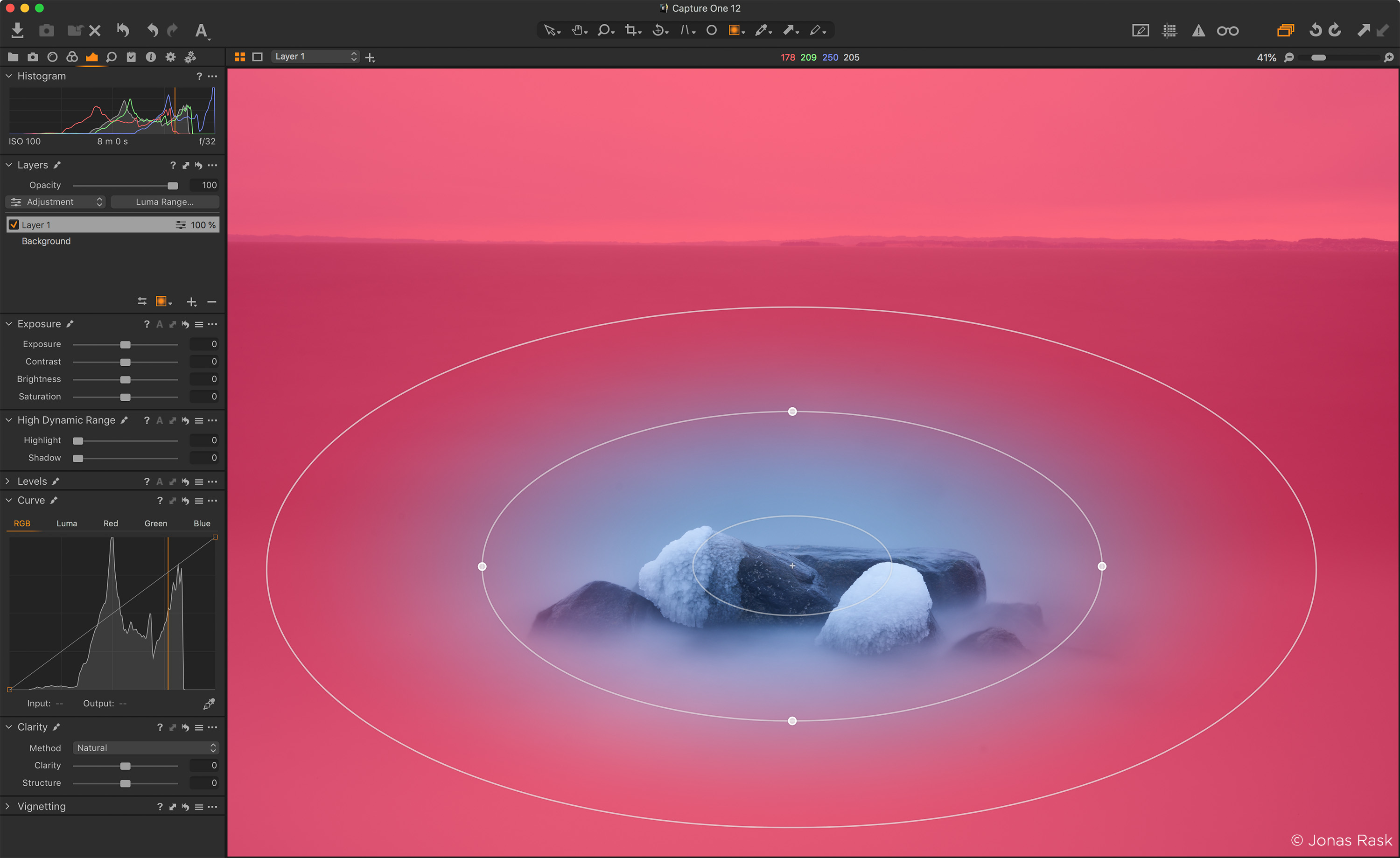
The new Radial Gradient mask tool enables quick, flexible radial masks, useful for vignette and other adjustments with a desired falloff effect. Using the same Parametric Masking Engine as the Linear Gradient mask tool, radial masks can be adjusted, rotated and moved after creation for extreme control over desired effects.
Redesigned Keyboard Shortcut manager
Capture One is known for its ability to custom-assign and custom-configure virtually every task to a keyboard shortcut. With more than 500 individually- assignable and customizable commands, it’s essential to be able to find the exact shortcut, without having to hunt through hundreds of choices.
Users can now search by the specific menu command, or by the assigned keyboard shortcut, making it easy to find and manage shortcuts. To unify the interface between the Mac and Windows versions the new menu system has been moved to the same location on both platforms, making it easier for workgroups to stay in sync.
New plug-in ecosystem
To address the needs of photographers and creatives looking to share, edit and collaborate on their images, the new Capture One plug-in ecosystem will allow for powerful third-party extensions. The new Capture One SDK will allow any developer to create custom solutions to expand Capture One, and to transform Capture One into an open ecosystem.
Users of Capture One will be able to extend the platform with the upcoming addition of plug-ins that allow for sharing, editing, and that can connect Capture One to a variety of specialized editing tools.
For developers, the Capture One Plugin SDK—available as a free download—will provide access to the broad base of passionate professional and enthusiast photographers that use Capture One. Developers are now able to create solutions that leverage the image-editing and organizational prowess of Capture One, and the added capabilities of third-party resources.
The initial Capture One Plugin SDK allows for plugin development, and can be leveraged for common tasks like sharing, sending files to external editors, and allowing images to be opened in other applications, and more.
Fujifilm Film Simulation support
Fujifilm X-Series and GFX-series cameras feature Film Simulations, which are in- camera tonal adjustments that faithfully reproduce the color and tonality of classic Fujifilm photographic films. Sixteen Film Simulations are available, ranging from color stocks like Provia and Velvia to black and white film like Acros. These simulations give Fujifilm users the ability to digitally capture images with the feel of beloved photographic films.
Thanks to the collaboration between Capture One and Fujifilm, photographer’s using Fujifilm’s renowned X-Series and GFX-series cameras will be able to edit photos complete with Fujifilm Film Simulations. These in-camera settings have been faithfully reproduced in Capture One, to provide an identical experience when working with files, resulting in images that appear the same as if the Film Simulation picture profiles were applied in-camera.
Extended AppleScript support
Users of Capture One on Mac OS can take advantage of extended AppleScript support for automation and workflow streamlining. More than a dozen of Capture One 12’s areas and properties can now be directly modified with AppleScript, adding to the existing, robust AppleScript support in previous versions of Capture One.
-> New camera and lens support
Capture One provides users with the most accurate and powerful image editing available, and the wide-ranging support of cameras and lenses is a hallmark of the software. For enthusiasts and professionals alike, Capture One continually evolves to handle the newest cameras and lenses.
Phase One carefully evaluates and interprets each camera’s RAW formats, allowing Capture One to present images with the utmost fidelity, often bringing out nuances that other programs can’t even perceive.
In addition to the RAW support for more than 500 cameras, Capture One also provides profiling and image correction support for more than 500 lenses. Like with the RAW file interpretation, Phase One carefully measures the optical characteristics of each supported lens and builds correction algorithms that compensate for the various optical imperfections of various designs. As a result, Capture One can correct for numerous common optical issues such as vignette, and chromatic aberration as needed for each of the supported lenses.
New camera support:
• Nikon Z7
• Nikon Z6
• Canon EOS R
• Canon EOS M50
For a complete list of supported cameras, please go to:
www.phaseone.com/supported-cameras
Availability and pricing
Capture One is available in several versions. Capture One Pro 12 supports more than 500 cameras from all major camera brands, while Capture One Pro Sony 12 and Capture One Pro Fujifilm 12 supports cameras from those brands, respectively.
Phase One is committed to providing customers a choice when it comes to how they acquire their software, so Capture One Pro 12 is available for purchase, or via subscription. The perpetual license for Capture One Pro 12 is available for $299, with upgrade pricing from previous versions starting at $149. Capture One Pro Sony and Capture One Pro Fujifilm are available for $219
For those that prefer subscription models, Capture One Pro 12 is available for plans as low as $15 per month, and Capture One Pro Sony and Capture One Pro Fujifilm subscription plans start at $14 a month.
For a complete list of all products and licensing options, please visit: www.phaseone.com/store to learn more.
A 30-day fully-featured free trial of Capture One 12 is available. Download the trial here: www.captureone.com/download
–
Get additional 10% off using our code “AMB43R” when buying Capture One 12.