New Olympus E-M1II firmware update tests by Robin Wong, Peter Forsgård and Photo Bern

Share

More info about the firmware update on GetOlympus

Here are two video reviews from Robin Wong and Peter Forsgård:

Robin Wong also wrote a blo post and the conclusion says:

I applaud Olympus for providing such a significant update for E-M1 Mark II. After all, this camera has been around since 2016, with the updated and reworked camera features, the new Firmware 3.0 brings E-M1 Mark II closer to E-M1X especially when it comes to AF improvement, which to me is a critical upgrade. This will directly affect the camera performance across all shooting scenarios.

There is also a German written review by Photo Bern.

Share

Olympus MC-20 teleconverter officially announced!

Share

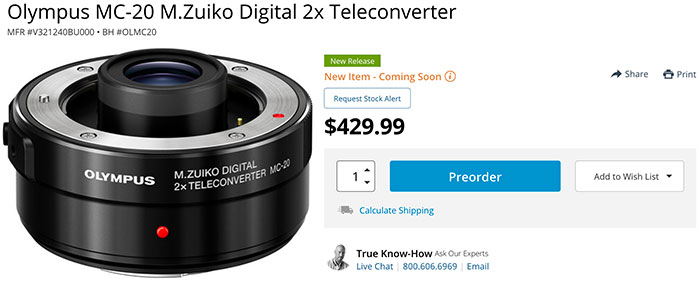
Olympus has announced the new 2x Teleconverter for the 40-150mm f/2.8 and 300mm f/4 Pro lenses. You can preorder it now on BHphoto, GetOlympus and Adorama.

OLYMPUS M.ZUIKO® DIGITAL 2x TELECONVERTER MC-20

Expand the Field of Photography with Portability and Superb Image Quality of the Master Lens

CENTER VALLEY, Pa., June 19, 2019 – Olympus is pleased to announce the M.Zuiko Digital 2x Teleconverter MC-20. This teleconverter doubles the focal length of the master lens, and features dustproof, splashproof and freezeproof (-10°C) professional weatherproof construction for outstanding optical performance ideal for even the most severe environmental conditions. By doubling the maximum shooting magnification of the master lens, this teleconverter further expands the field of photography in super telephoto macro shooting. This product is compatible with the M.Zuiko Digital ED 40-150mm F2.8 PRO and M.Zuiko Digital ED 300mm F4.0 IS PRO, as well as the M.Zuiko Digital ED 150-400mm F4.5 TC1.25x IS PRO, which is currently under development.

Super Telephoto and Super Telephoto Macro Shooting

Just like the M.Zuiko Digital 1.4x Teleconverter MC-14, the M.Zuiko Digital 2x Teleconverter MC-20 maintains the excellent imaging performance of the master lens while doubling the focal length, making it possible to capture intense shots of subjects that are usually difficult to approach, including small birds and animals. When attached to the M.Zuiko Digital ED 300mm F4.0 IS PRO, handheld super telephoto shooting at 1200mm equivalent (35mm equivalent) is possible.

When attached to the M.Zuiko Digital ED 300mm F4.0 IS PRO, the MC-20 allows the user to shoot near actual size at 0.96x (35mm equivalent) from the maximum shooting magnification of 0.48x. With performance like this, the photographer can capture close-up photos from far away without disturbing subjects that are sensitive to people, such as insects. Utilizing Focus Stacking results in photos that are in focus across the entire image, even on super telephoto lenses, which tend to have a shallow depth of field.

Outstanding Optical Performance

A 9-element, 4-group lens construction with an HR lens helps suppress various types of aberrations including chromatic aberration while maintaining the excellent optical performance of the master lens to double the focal length. The design also helps prevent ghosts and flares for superb image performance, thanks to ZERO coating.

Reliability to Capture the Moment

The master lens is designed to deliver excellent performance and dependable reliability, even when an Olympus teleconverter is attached. Virtually no loss in autofocus speed makes it possible to capture split-second photo opportunities using FAST AF performance. The dustproof, splashproof, and freezeproof professional weatherproof construction, coupled with powerful 5-axis image stabilization and FAST AF ensures that the user captures their shot even in the most severe environments.

Compatible Lenses

  • Zuiko Digital ED 40-150mm F2.8 PRO
  • Zuiko Digital ED 300mm F4.0 IS PRO
  • Zuiko Digital ED 150-400mm F4.5 TC1.25x IS PRO (under development-planned for launch in 2020)

Pricing and Availability

The Olympus M.Zuiko Digital 2x Teleconverter MC-20 ships with the body cap BC-3, lens cap LR-2 and lens case LSC-0603 and is available now with suggested retail prices of $429.99 USD and $559.99 CAD.

Share

New firmware updates for the E-M1X to the E-M1 Mark II

Share

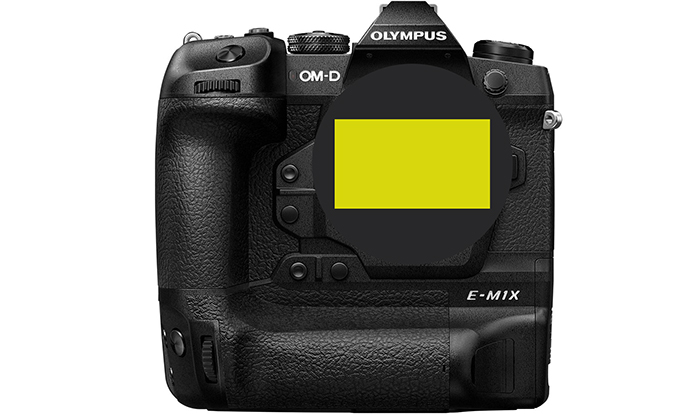
Big news folks! Olympus released a major firmware update for the two flagship cameras!

Press release via Dpreview

OLYMPUS ANNOUNCES FIRMWARE UPGRADES ENHANCING AUTOFOCUS PERFORMANCE AND IMAGE QUALITY

Version 3.0 for the OM-D® E-M1 Mark II, Version 1.1 for the OM-D E-M1X and Version 1.1 for Olympus® Workspace

CENTER VALLEY, Pa., June 19, 2019 – Olympus is pleased to announce availability of the latest firmware upgrade for two interchangeable lens cameras, Version 3.0 for the Olympus OM-D E-M1 Mark II and Version 1.1 for the Olympus OM-D E-M1X. Additionally, Firmware Version 1.1 is now available for Olympus Workspace. OM-D E-M1 Mark II firmware Version 3.0 adds high-precision autofocus (AF) performance and the high image quality currently available on Olympus’ newest OM-D, the E-M1X. Specifically designed for the professional models in the OM-D series, the OM-D E-M1 Mark II and OM-D E-M1X, this new firmware provides feature enhancements for photographers who require portability and smooth operation of the camera when shooting.

OM-D E-M1 Mark II Firmware Version 3.0: Main Features

Advanced AF Performance

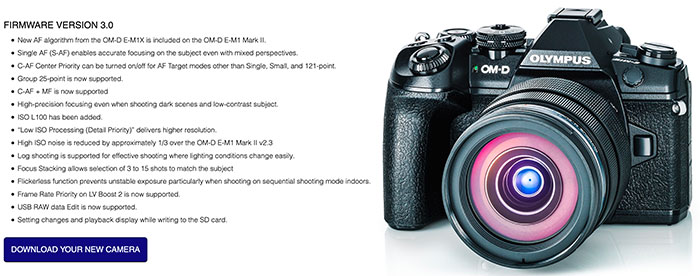
This upgrade utilizes the OM-D E-M1X algorithm, which was developed based on the shooting needs of the professional photographer. With the goal of achieving performance that responds to demanding shooting conditions, such as fast movement in sports, etc., C-AF Center Priority delivers high-precision tracking of moving subjects and sudden subject movement. AF precision for still subjects when using S-AF is improved for various subjects compared to OM-D E-M1 Mark II firmware Version 2.3. Active use of information from the On-chip Phase Detection AF sensor also improves AF performance while shooting video.

Newest AutoFocus Features

Group 25-point has been added to AF Target, and is effective for photographing birds and other small subjects. C-AF Center Priority is now available, and repeatedly autofocuses with priority on the center point in Group 5-point, Group 9-point, and Group 25-point. If AF is not possible in the center point, the peripheral points in the group area assists, which is effective for subjects that move around quickly. In addition, C-AF+MF1 is included which allows users to instantly switch to MF by turning the focus ring while in C-AF for fine tuning the focus.

Low Light Limit Update

The AF low light limit when an f/1.2 lens is attached is -6.0 EV (ISO 100 equivalent for S-AF), enabling high precision focusing in both dark scenes and for low-contrast subjects.

Improved Image Quality

Low ISO Processing (Detail Priority) has been added for higher resolution when shooting at low ISO sensitivity[1], making it possible to reduce noise while shooting with low ISO settings. Compared with OM-D E-M1 Mark II firmware Version 2.3, noise that occurs when shooting at high ISO sensitivity is improved approximately 1/3 of a step.

Support for New Functions in Olympus Workspace

USB RAW Data Edit[2] is now supported for much faster RAW processing in Olympus Workspace by connecting the camera to a computer to use the power of the OM-D E-M1 Mark II TruePic™ VIII image processor.

Enhanced Operability

  • Anti-flicker shooting added to prevent unstable exposure, particularly when sequential shooting indoors.
  • OM-Log400 movie-exclusive picture mode added, allowing the user to shoot movies without loss of details in shadows or highlight blowouts, delivery greater freedom over video creativity through color grading.
  • Frame Rate Priority added to Live View Boost/On2 display, displaying images at a comfortable brightness, even in especially dark locations, such as under a starlit sky without lowering the frame rate.
  • From 3 to 15 shots can be selected in Focus Stacking and guide lines have been added to the shooting area
  • Quick image selection added
  • Setting changes and playback display while writing to card now possible, facilitating quick operation.
  • Instant Film added to Art Filter
  • ISO L100 (ISO 100 equivalent) added

OM-D E-M1X Firmware Version 1.1 Main Features

Support for New Functions in Olympus Workspace

USB RAW Data Edit is now supported for much faster RAW processing in Olympus Workspace by connecting the camera to a computer to use the power of the OM-D E-M1X TruePic VIII image processor.

Olympus Workspace Image Editing Software Version 1.1: Main Features

Focus Stacking added for compositing images shot in Focus Bracketing[3]

Previously, when using Focus Stacking on a computer, it was necessary to use commercially available third party software to composite images. Now, t is possible to composite up to 999 images in Olympus Workspace.

Lighten Composite added

Lighten Composite is now supported by Olympus Workspace, making it possible to create images similar to Live Composite on the camera. Darken Composite has also been added.

Support for New Functions in Olympus Workspace

USB RAW Data Edit has been added for much faster RAW processing in Olympus Workspace by connecting the camera to a computer, using the power of the OM-D E-M1 Mark II and OM-D E-M1X TruePic VIII image processor.

Function Support Chart

✓ reflects the functions that have been upgraded with the firmware.

Feature E-M1X Ver. 1.1 E-M1 mark II Ver. 3.0
AF Group Target 25-point Already available
Custom AF Target Already available
C-AF Center Priority Already available
C-AF Center Start Already available
C-AF+MF Already available
Intelligent Subject Detection AF Already available
Anti-flicker shooting Already available
OM-Log 400 Already available
ISO L100 (ISO 100 equivalent) Already available
Frame Rate Priority on Live View Boost/On2 Already available
Focus Stacking: Select from 3 to 15 images Already available
Focus Stacking: Guide line display Already available
Art Filter: Instant Film Already available
Low ISO Processing (Detail Priority) Already available
Setting changes and playback display while writing to card Already available
Quick image selection Already available
USB RAW Data Edit
Live ND shooting Already available
Handheld High Res Shot Already available
High-speed shooting: 120 fps (1920×1080/ MOV) Already available
Bluetooth® connection Already available
UHS-II compatible dual card slots Already available
GPS® / Field Sensor System Already available
USB power supply/battery charging Already available
Multi Selector Already available

Please visit the following URL for access to Olympus software and Digital Camera Updater: https://www.getolympus.com/us/en/software

Pricing and Availability

Firmware Version 3.0 for the Olympus OM-D E-M1 Mark II, Firmware Version 1.1 for the Olympus OM-D E-M1X and Firmware Version 1.1 for Olympus Workspace are available at no charge as an ongoing value demonstrating Olympus’ commitment to continuous product improvements.

[1] May affect the number of sequential shots in normal sequential shooting priority modes.

[2] This new function makes RAW processing much faster by using the TruePic VIII image processor on the camera via USB connection. Olympus Workspace and the supported camera must both be updated with required firmware. The available editing options from Olympus Workspace are limited to RAW editing options that can be handled internally in the camera. Compatible models are OM-D E-M1X and OM-D E-M1 Mark II, and images are saved in JPEG format.

[3] Images must be shot with a lens that supports Focus Stacking.

Share

Today only: Mega Deal Zone offers at BHphoto!

Share

100+ items are on discount on today’s BHphoto Dealzone. Here are a few strictly MFT related deals:

$230 off on the SmallHD FOCUS OLED DMW-BLF19 Kit for Panasonic GH5S/5/4/3
$140 off on the Lensbaby Trio 28 Lens with Filter Kit for Micro Four Thirds
$60 off on the Mitakon Zhongyi 20mm f/2 4.5x Super Macro Lens for Micro Four Thirds
$30 off on the Vello FreeWave Plus Wireless Remote Shutter Release (For Select Panasonic, Olympus)
$25 off on the Vello Canon EF/EF-S Lens to Micro Four Thirds Camera Lens Adapter
$20 off on the Oben Camera Grip with Arca Plate for Olympus OM-D E-M10 & E-M10 Mark II

Kickstarter projects:

  1. You can now preorder the new Kamlan 50mm f/1.1 MFT lens for $199 on Kickstarter.
  2. Peak design has just launched a compltely new kind of Tripod on Kickstarter.
  3. DUO photographers bag on Kickstarter.
Share

New SILKYPIX Developer Studio Pro9 for Panasonic!

Share

SILKYPIX announced the new Developer Studio Pro9 for Panasonic.

About SILKYPIX Developer Studio Series

The SILKYPIX Developer Studio series is a general-purpose RAW Development software*1 for converting RAW images shot with digital cameras into JPEG and TIFF. RAW images capture a wealth of image data with every shot using the camera’s sensors. All this image information reduces the likelihood of image quality deterioration even after image processing adjustments are made, such as in brightness and color. This makes it more than suitable for editing high-quality photographs.
The SILKYPIX Developer Studio series offers features such as are smooth gradation, beautiful color reproduction, high resolution, high dynamic range, and low noise, and which are powered by proprietary video engines.

*1 As of June 18, 2019, the system is compatible with the RAW Development process for digital cameras of the 739 model.

Background of Developing Panasonic Versions and FUJIFILM Versions

In addition to the SILKYPIX Developer Studio series sold by Ichikawa Soft Laboratory, SILKYPX is provided free of charge as bundled RAW Development software to users who use Panasonic and FUJIFILM digital cameras*2 used by many photographers around the world.
Against this backdrop, many people who use bundled-version SILKYPIX have asked for the use of the highlight/shadow individual brightness correction, partial correction, and dehaze functions of the SILKYPIX Developer Studio Pro9. Therefore, as a special project to mark the 15th anniversary of the launch of the SILKYPIX Developer Studio, we developed RAW Development software limited to Panasonic and FUJIFILM cameras at reasonable prices for limited periods of time.

*2 RAW Development Software for Panasonic … “SILKYPIX Developer Studio SE”, RAW Development Software for FUJIFILM … “RAW FILE CONVERTER EX powered by SILKYPIX”

Product Overview

Products name SILKYPIX Developer Studio Pro9 for Panasonic downloaded version (Windows/macOS)
Sales period June 18, 2019 12:00 – September 30, 2019 (JST)
Price 3980 JPY (including tax)
Sale ISL Online Store https://shop.isl.co.jp/?lang=en
URL https://silkypix.isl.co.jp/en/ext/special/dsp9pana/
Other
  • Only Panasonic cameras sold as of June 18, 2019 are available.
    [Important] The camera will not be added or updated.
  • The files that can be developed with this product can only be handled as RAW/JPEG files shot with Panasonic cameras supported by this product and JPEG/TIFF files from RAW images shot with Panasonic digital cameras.
  • Please note that you cannot use RAW images shot with digital cameras other than the compatible models or JPEG/TIFF files that do not have appropriate data.
  • You cannot upgrade to the SILKYPIX normal series from this product.
Products name SILKYPIX Developer Studio Pro9 for FUJIFILM downloaded version (Windows/macOS)
Sales period Planned launch in late July 2019 to September 30, 2019 (JST)
Price 3980 JPY (including tax)
Sale ISL Online Store https://shop.isl.co.jp/?lang=en
URL https://silkypix.isl.co.jp/en/ext/special/dsp9fuji/
Other
  • Only FUJIFILM cameras sold as of the date of release will be available.
    [Important] The camera will not be added or updated.
  • The files that can be developed with this product can only be handled as RAW/JPEG files shot with FUJIFILM cameras supported by this product and JPEG/TIFF files from RAW images shot with FUJIFILM digital cameras.
  • Please note that you cannot use RAW images shot with digital cameras other than the compatible models or JPEG/TIFF files that do not have appropriate data.
  • You cannot upgrade to the SILKYPIX normal series from this product.

Features of SILKYPIX Developer Studio Pro9 for Panasonic / for FUJIFILM

Dehaze function

Adjusting the hazy image with the “Dehaze” slider removes cloud-like distortions in your image caused by water vapor in the air and leaves the image with just as much clarity as if it were taken on a bright sunny day.

Individual adjustment of brightness of highlight/shadow area of photograph

The Highlight/Shadow sliders in the exposure adjustments allows you to manually adjust the brightness of the bright (highlight) and intensity of dark (shadow) portions of the image. Even when shooting subjects with intense contrast while using exposure compensation, it is sometimes still difficult to control the exposure. Here, simply adjust the “highlight/shadow” individually during RAW development to achieve a result suitable for the image of the Photographer.

Partial correction tool

Partial tone correction can be applied to specified area of the image. For example, brightness and White balance can be partially adjusted. The selection methods of the correction area include “circular correction filter”, “gradual correction filter”, “brush”, etc., and can be corrected by carefully specifying the area.

Blurred / Sharp periphery functions

You can blur or sharpen the periphery of the specified range. Blurred periphery produces a close-up effect by blurring the periphery of your subject. In addition, if the image is shot with the aperture opening value of the lens and the resolution of the peripheral area drops, the “Sharp periphery” can be used to make a good correction.

Auto adjustment button

The Auto adjustment buttons for Auto exposure bias, Auto White Balance Setting, and Automatic Level Correction, which are suitable for the respective images, have been recently added. The Auto adjustment button is recommended for those who are “having a first try at RAW Development” or say “RAW Development has so many adjustment options and don’t know what to do.” In addition, when making adjustments to a large number of images at a time, you can improve the efficiency of editing workflow by using the Auto adjustment button.

Search in thumbnails

Search in thumbnails is a function for searching and displaying images by specifying a condition such as “shooting info” such as File name or Date, comments, or ratings from specified folders. You can also specify multiple folders at the same time, which is a very useful feature for locating the desired image within a larger collection.

Other

These include the independent placement of initialization buttons for instantaneously returning images to their pre-adjusted states, the addition of user-mark colors for image selection, and the easy transfer of images from the SILKYPIX to retouching software.

SILKYPIX Developer Studio Pro9 for Panasonic / for FUJIFILM System requirements

Windows macOS
64-bit version of Microsoft® Windows® 10 / 8.1 / 7 (Service Pack 1 and later)
* The tablet mode is not supported for Microsoft® Windows® 10 tablet mode.
* It does not support the 32-bit OS.
macOS® v10.9 – v10.14
Intel® Core 2 Duo or more, or AMD Athlon 64 X2 or more processor Intel® Core 2 Duo or more processors (required for 64 bits)
RAM of 4 GB or more (recommended for 8 GB or more) RAM of 4 GB or more (recommended for 8 GB or more)
Hard disk with a free space of 10 GB or more Hard disk with a free space of 10 GB or more
1,024×768 Displays that support the above screen resolutions 1,024×768 Displays that support the above screen resolutions

* You can register SILKYPIX Developer Studio Pro9 to three different PCs/Macs.

  • SILKYPIX® is a registered trademark of Ichikawa Soft Laboratory Co., Ltd.
  • Windows® is a registered trademark of Microsoft®.
  • macOS® is a registered trademark of Apple, Inc.
  • Intel® is a registered trademark of Intel Corporation.
  • Other company names and product names are generally trademarks and registered trademarks of each company.
Share