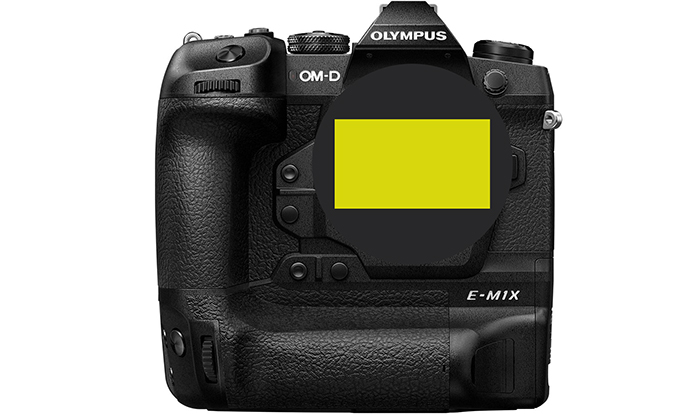

Why should Olympus venture into full frame in 2019 (by sneye)

[shoplink 28222 ebay][/shoplink]

Image on top. The “Full Frame” [shoplink 28222 ebay]OM-1 film camera[/shoplink].
This is a guest post from our reader Sneye:
Why should Olympus venture into full frame in 2019

I have been a mostly satisfied user of the 4/3 and Micro 4/3 systems for the past decade. I always considered those systems good enough for my needs and enjoyed their versatility and endurance a lot. But the times are changing and with smartphone cameras edging ever closer to the established systems in image quality and in usability – 2019 might be the right time for Olympus to try something new. Here’s why.

2019 will mark the beginning of the process whereby Canon and Nikon abandon their mirrored mounts. This is expected to give the camera market a good shake. Long time users of Canon or Nikon gear will be freed off their imposed loyalty. It’s a good timing for smaller players to throw in their own disruptions. Olympus has acquired some expertise in various aspects of the mirrorless  technology and imaging in general. These days it offers a system that is physically robust, offers great JPEG out of the camera and is mostly fuss-free due to great AF and stabilization. Combine this low-maintenance philosophy with a larger sensor and you have serious competition to every other system on the market. Olympus will be bound to design and produce many new lenses in a short time, but so will Canon and Nikon. If the back flange distance is large enough, good lenses could be small and relatively simple to manufacture.

The progress in sensor technology has been slowing down in the past decade. Thus no real improvements in image quality are expected between camera generations, which manifests itself in a slowing market. In such a climate players are compelled to increase margins by concentrating on high-end products. Tge high pricing of the E-M1 mark II puts it in uncomfortable competition with larger formats. Olympus will not be able to get away with it for long. It will have to either reduce the price of its flagship or make it more competitive. To many users lens size alone is not regarded an adequate justification for paying a premium.

Phone cameras have been nibbling at the market for a while now and with multiple synchronized exposures becoming standard Micro 4/3 does not seem advantageous enough for Olympus to sit on its laurels. Of course, some aspects of computational imaging will make their way into “real” photography, but others will not due to bulkiness and complication. A larger sensor will at least buy Olympus a few more years in the game.
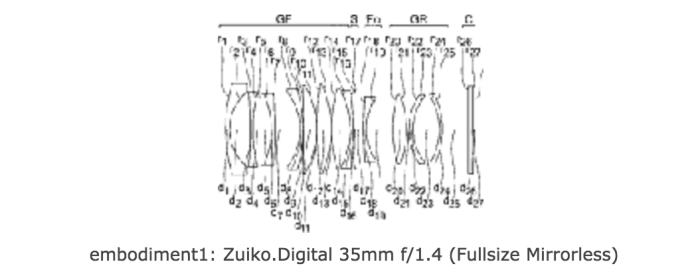
Bildschirmfoto 2016-01-22 um 07.22.30
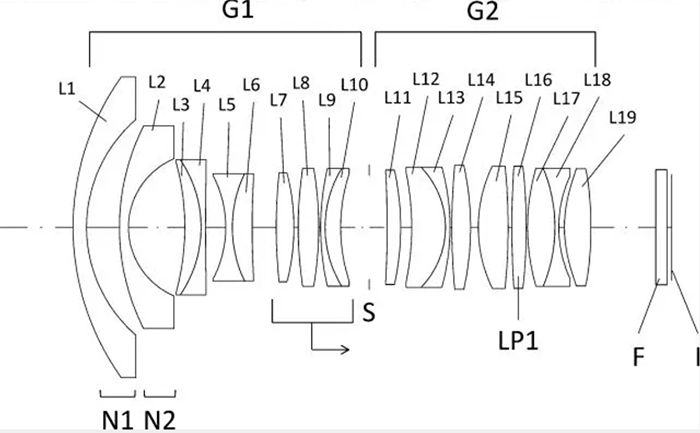
The Olympus patent describing a 35mm f/1.4 FF lens for a FF mirrorless
Evidence

2019 is Oly’s century anniversary. A good occasion to rethink and replan. Iit’s a good occasion to release something special, too.
Olympus has filed a few FF lens patents. As far as I know they are yet to be incarnated in actual optics in other systems, so they might be intended for use by Olympus itself.

The latest rumor suggests a new OMD camera announcement early next year. The time frame does not match the life cycles of existing OMDs (the E-M5 mark III should be announced before Photokina), but rather Canon’s and Nikon’s mirrorless announcements.

To end this discussion, I personally think that the real life advantage of full frame cameras over 4/3 has never been less significant (I use both formats). Most Micro 4/3 users do not need FF, even many of those who think they do. Nevertheless, due to a peculiar combination of circumstances Olympus can benefit from such an investment. Refraining from making it might mark the beginning of the end for Olympus Imaging.

Sneye
 

a bit of everything…


Sunset Expedition with the Olympus E-M1 Mark II

Did a 17LB. Lobster just destroy some of our GH5 footage??? or did Drew F up? Road Trip Challenges (CRFTSHO).
Super fast photography with the Lumix G9 (Smallworldlivelarge).
Minimalist What’s In My Camera Bag – Micro Four Thirds Travel (Bajigurwedangronde)
Insta360 Titan 10K VR 360 Stereo Camera (Personal View).
Tools of the Trade for Panoramic Photographers (Explora).

Share your best pictures on our new Instagram MicroFourThirdsGallery.

Plenty of news on the facebook E-M1II group and the GH5 group.

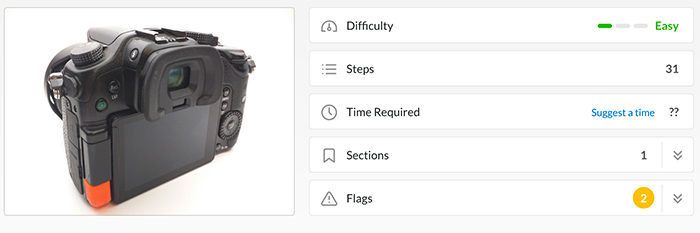
Panasonic Lumix DMC-GH3/GH4 LCD Hinge Cover Replacement guide

Anthony Kouttron sent me this useful information:

I have been repairing lumix Gh series cameras for several years now, but something I have been noticing with the GH3 and GH4 cameras is the failure of the LCD hinge cap. They crack over time from just normal use. panasonic does not sell these parts leaving your camera lcd cable exposed to damage. I CADed up this hinge cap for free for someone to download and print. I made a guide here. It is a guide on ifixit, so the images and media are under a creative commons license. Feel free to link it!

https://www.ifixit.com/Guide/Panasonic+Lumix+DMC-GH3+LCD+Hinge+Cover+Replacement/108291

Thanks Anthony!

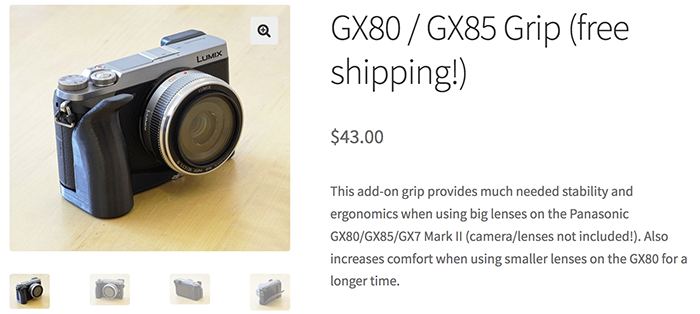
You can now 3D print your GX80 / GX85 Grip

Isaac sent me this:

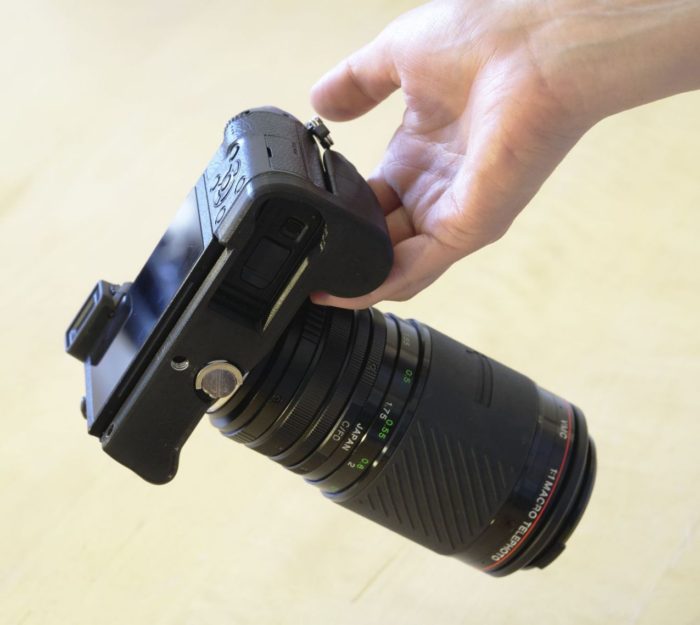
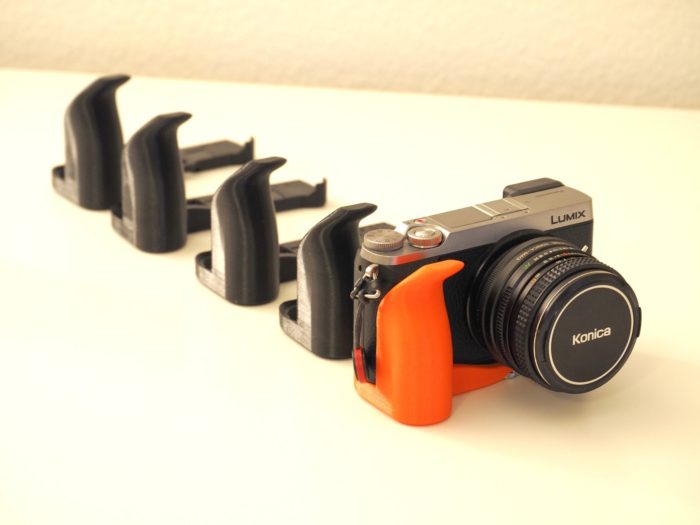
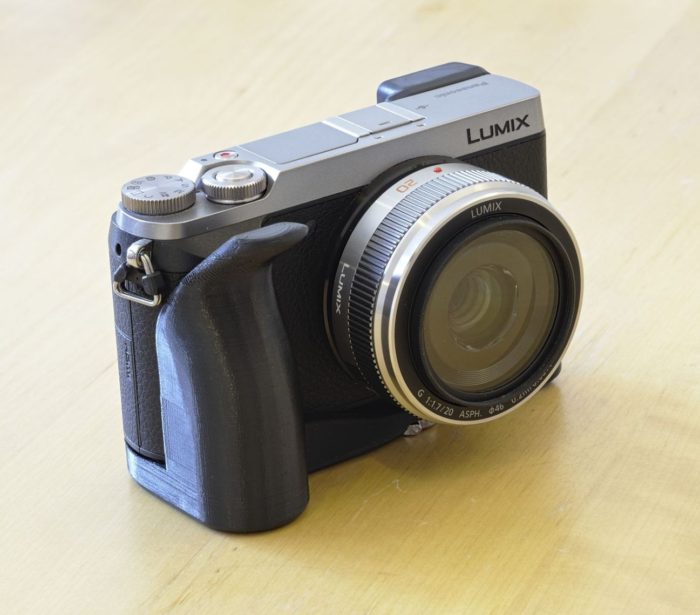
I have made an add-on grip for the Panasonic GX80/GX85 camera. People on Facebook really liked the grip, so I have made a small website where you can buy it: https://ibd.murff.ch/gx80grip/?product=gx80-gx85-grip-free-shipping
The grip is better than Panasonic’s official grip because you can access the battery and the SD card slot while the grip is installed. Also, it is cheaper with shipping included.
The grip is NOT completely compatible with the GX9. The GX9 has a different battery compartment shape, so you wouldn’t be able to open it with this grip.

a bit of everything…


M.Zuiko Digital ED 17mm 1:1.2 PRO – In-Depth with Gordon Laing

Basketball with the london lions (Olympus UK).
Q&A ► Bulb Mode on GH5 (PhotoJoseph).
Panasonic Leica 200mm f/2.8 Examples (Diglloyd).
Kinefinity Mavo Cinema Cameras and Mavo Cinema Primes (Personal View).
Cameras on 25 Interplanetary Spacecraft (Explora).

Share your best pictures on our new Instagram MicroFourThirdsGallery.

Plenty of news on the facebook E-M1II group and the GH5 group.

Michael Fowler:Lumix g85 with the SLR Magic 25mm t0.95. absolute favorite lens for m43. critique is welcome! https://www.youtube.com/watch?v=HsaoxE3yiEM

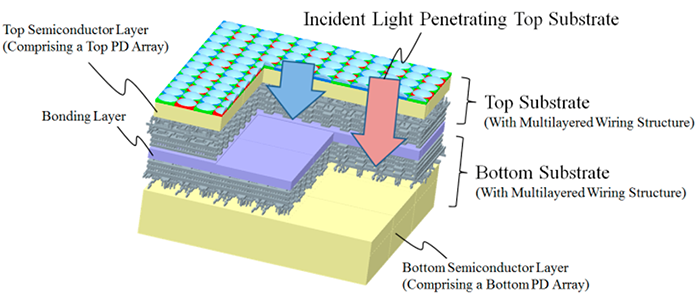
Olympus shows new Multi-Storied Photodiode Sensor

A new Olympus paper discloses the details about the “Multiband Imaging CMOS Image Sensor with Multi-Storied Photodiode Structure“:

“We developed a multiband imaging CMOS image sensor (CIS) with a multi-storied photodiode structure, which comprises two photodiode (PD) arrays that capture two different images, visible red, green, and blue (RGB) and near infrared (NIR) images at the same time. The sensor enables us to capture a wide variety of multiband images which is not limited to conventional visible RGB images taken with a Bayer filter or to invisible NIR images. Its wiring layers between two PD arrays can have an optically optimized effect by modifying its material and thickness on the bottom PD array. The incident light angle on the bottom PD depends on the thickness and structure of the wiring and bonding layer, and the structure can act as an optical filter. Its wide-range sensitivity and optimized optical filtering structure enable us to create the images of specific bands of light waves in addition to visible RGB images without designated pixels for IR among same pixel arrays without additional optical components. Our sensor will push the envelope of capturing a wide variety of multiband images.”

As usual with those papers…we don’t know if such tech will be used on future Olympus cameras. but it shows Olympus is working to develop their own sensor tech.

via Image Sensor World

The full original english GH5-GH5s-G9 firmware update text

On May 30 Panasonic new firmware update will be available here: http://av.jpn.support.panasonic.com/support/global/cs/dsc/download/index.html

This the original english text with the improvements:

DC-G9 Firmware Update

Panasonic offers firmware update program for DC-G9 to enhance the performance and usability.

1. Improvement of AF performance
• AF tracking performance in video recording has been improved.

2. Improvement of Body I.S.(Image Stabilizer) performance
• There were cases where peripheral distortion occurred in video recording while walking when used with Panasonic wide zoom lenses (H-F007014, H-E08018). This bug has been fixed.

3. Improvement of High Resolution Mode
• Performance of motion correction has been improved.
• Minimum F11 aperture can be used.
• There were cases where the High Resolution Mode is force-quit when switching to playback mode. This bug has been fixed.

4. Improvement of sound recording performance
• Sound quality has been improved by optimizing the noise reduction performance of internal noise cancelling microphone.

5. New functions
• [L.Monochrome D] has been added to Photo Style.
• [Grain Effect] can be added and adjusted in Photo Style.
• [Live View Boost] has been added, which makes it easy to check the composition on the monitor in low-light environment.
• Maximum 20x enlarged view is available in [MF Assist].
• [Focus Ring Lock] has been added to [Custom] menu, which disables focus ring operation to lock the focus.
• [WB/ISO/Expo. Button] has been added, which enables adjustment of WB/ISO/Exposure only while the exposure compensation button is pressed. This can be set [Custom]>[Operation].
• [Dial] has been added to [Custom]>[Operation Lock Setting].

6. Other improvements
• [Focus Ring Lock], [E-Stabilization(Video)], [Mic Rec Level Disp.], [Live View Boost],and [L.Monochrome D] can be assigned to the Fn button that works in recording mode.
• It is possible to choose images from group display such as burst shots in [RAW Processing] mode.
• Restarting time from sleep mode has been shortened while using Image App and Bluetooth connection.
You can choose to shorten the time of remote operation and image transfer or remote shutter control in [Setup]>[Bluetooth]>[Returning from Sleep Mode].
• There were cases where folder name was garbled when connecting wirelessly with Windows10-based PC. This bug has been fixed.

DC-GH5S Firmware Update

Panasonic offers firmware update program for DC-GH5S to enhance the performance and usability.

1. Improvement of AF performance
• AF performance of photo shooting under low-light, low-contrast environment has been improved.
• AF speed at 180d (180°) has been improved when displaying the shutter speed in degrees in [SS/Gain Operation]>[ANGLE/ISO].

2. Improvement of sound recording performance
• Sound quality has been improved by optimizing the noise reduction performance of internal noise cancelling microphone.

3. New functions
• [L.Monochrome D] has been added to Photo Style.
• [Grain Effect] can be added and adjusted in Photo Style.
• [Focus Ring Lock] has been added to [Custom] menu, which disables focus ring operation to lock the focus.
• [WB/ISO/Expo. Button] has been added, which enables adjustment of WB/ISO/Exposure only while the exposure compensation button is pressed. This can be set [Custom]>[Operation].
• [Dial] has been added to [Custom]>[Operation Lock Setting].

4. Other improvements
• [Focus Ring Lock], [E-Stabilization(Video)], [Sound Rec Level Disp.] and [L.Monochrome D] can be assigned to the Fn button that works in recording mode.
• Vector Scope can be displayed on the screen while adjusting white balance.
• It is possible to choose images from group display such as burst shots in [RAW Processing] mode.
• There were cases where the Image Stabilizer icon was not displayed when switching the settings of Image Stabilizer using the Fn button on the H-ES200 interchangeable lens. This bug has been fixed.
• There were cases where folder name was garbled when connecting wirelessly with Windows10-based PC. This bug has been fixed.

DC-GH5 Firmware Update

Panasonic offers firmware update program for DC-GH5 to enhance the performance and usability.

1. Improvement of AF performance
• AF tracking performance in video recording has been improved.
• AF speed at 180d (180°) has been improved when displaying the shutter speed in degrees in [SS/Gain Operation]>[ANGLE/ISO].

2. Improvement of Body I.S.(Image Stabilizer) performance
• There were cases where peripheral distortion occurred in video recording while walking when used with Panasonic wide zoom lenses (H-F007014, H-E08018). This bug has been fixed.

3. Improvement of sound recording performance
• Sound quality has been improved by optimizing the noise reduction performance of internal noise cancelling microphone.

4. New functions
• [L.Monochrome D] has been added to Photo Style.
• [Grain Effect] can be added and adjusted in Photo Style.
• [Live View Boost] has been added, which makes it easy to check the composition on the monitor in low-light environment.
• [Night Mode] has been added, which reduces glaring on the screens when recording in low-light environment.
• Maximum 20x enlarged view is available in [MF Assist].
• [Focus Ring Lock] has been added to [Custom] menu, which disables focus ring operation to lock the focus.
• [WB/ISO/Expo. Button] has been added, which enables adjustment of WB/ISO/Exposure only while the exposure compensation button is pressed. This can be set [Custom]>[Operation].
• [Dial] has been added to [Custom]>[Operation Lock Setting].
• [Power/Wireless Indicator] has been added in [Setup] menu, which enables turning off the status indicator and wireless connection lamp.

5. Other improvements
• [Like 709],[V-LogL*] and [V-LogL View Assist*] in Photo Style can be used in photo shooting.
• [LUT Monitor Display*] and [LUT HDMI Display*] can be used in playback mode.
* Upgrade Software Key DMW-SFU1(sold separately) is required.
• [Focus Ring Lock], [E-Stabilization(Video)], [Mic Rec Level Disp.], [Live View Boost],[Night Mode] and [L.Monochrome D] can be assigned to the Fn button that works in recording mode.
• [LUT Monitor Display*],[LUT HDMI Display*] and [Night Mode] can be assigned to the Fn button that works in playback mode.
* Upgrade Software Key DMW-SFU1(sold separately) is required.
• Vector Scope can be displayed on the screen while adjusting white balance.
• It is possible to choose images from group display such as burst shots in [RAW Processing] mode.
• Restarting time from sleep mode has been shortened while using Image App and Bluetooth connection.
You can choose to shorten the time of remote operation and image transfer or remote shutter control in [Setup]>[Bluetooth]>[Returning from Sleep Mode].
• Remaining battery status is indicated by 1/4-gauge, indicating approximately 25% per gauge.
• There were cases where folder name was garbled when connecting wirelessly with Windows10-based PC. This bug has been fixed.