Up to -60% off on Luminar Neo and Luminar AI bundles

Share

Skylum launched new offers on Luminar AI and the future Luminar Neo bundles. You save additional $10 using our checkout code “43RUM” The offer ends on 31/01/2022

Luminar Neo offer:

1 seat:

  • Luminar NEO + 1 Free Pack – 30% discount:  69 $/€
  • Luminar NEO + Luminar AI + 1 Free Pack – 45% discount : 98 $/€
  • Luminar NEO + Luminar AI + Aurora HDR + 1 Free Pack – 61% discount: 108 $/€

2 seats:

  • Luminar NEO + 1 Free Pack – 25% discount:  89 $/€
  • Luminar NEO + Luminar AI + 1 Free Pack – 41% discount: 128 $/€
  • Luminar NEO + Luminar AI + Aurora HDR + 1 Free Pack  – 56% discount: 138 $/€
Luminar AI offer: 

1 seat:

  • Luminar AI + 1 Free Pack – 52% discount: 47 $/€
  • Luminar AI + Aurora + 1 Free Pack – 66% discount: 67 $/€
  • Luminar NEO + Luminar AI + Aurora HDR+ 1 Free Pack – 61% discount: 108 $ / €

2 seats:

  • Luminar AI + 1 Free Pack – 50% discount:  59 $/€
  • Luminar AI + Aurora HDR + 1 Free Pack – 64% discount: 79 $/€
  • Luminar NEO + Luminar AI + Aurora HDR + 1 Free Pack – 56% discount: 138 $/€

Share

Engadget: “the global chip shortage isn’t ending anytime soon”

Share

Let’s face it: The global chip shortage isn’t going away in 2022. This means most camera announcements will be pushed towards end 2022 with slow shipments til 2023. Engadget reports:

“I’d like to say things have improved, but they actually have gotten a little bit worse, and I’m not surprised,” O’Donnell said in a recent interview with Engadget. In April, he argued that the global chip shortage would continue throughout 2022 and into 2023. Now, he’s even more convinced that we won’t see any major relief until then.

If you are on the list for the new GH6 or OMD cameras well, don’t count to get them any time soon :(

Share

a bit of everything…

Share


BEST GH5 Prime Lens Nobody Talks About // The Tiny Mighty Super Fast Zhongyi Mitakon 25mm f0.95

Photo walk in super foggy Venice [with Lumix G9 Leica 12-60] I can’t see with “double fog” (Aiur Media).
Biegert & Funk Qlocktwo Watch shot with MFT gear by Jim Chung.
Bird Photography: Which Exposure Mode Is Right for You? (Explora).
Introducing the Versatile Profoto Clic Softbox Octa (42West).

Plenty of news on the facebook OMD group, Panasonic FF and the GH5 group.

Share

Topaz announced DeNoise AI v3.5 – Improved RAW color processing and performance

Share

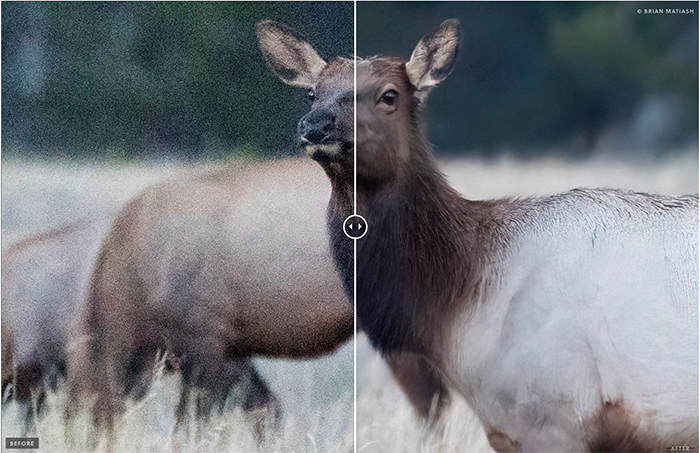
Topaz released the new DeNoise AI v3.5 update. You save 15% using our checkout code “rumor“.

Change log:

  • New theme for the app
  • Added ability to use eraser end of tablet stylus to erase mask
  • Added current mask to the navigator while in masking mode
  • Changed error “0” message on login to be more explicit about what may cause it (firewall/AV)
  • Removed “Error: CANCEL” text when canceling an export
  • Added an info box to prevent users from accidentally running the app from the DMG instead of installing (Mac only)
  • Remove All button removed when in external editor mode
  • Masking and Remove Image buttons now hidden when exporting
  • Progress bar for exporting should now only show on currently exporting image
  • Re-worded Side-by-side View → Side-by-Side View
  • Re-worded Re-Install Photoshop Plugins → Install Photoshop Plugin
  • Changed in-app update flow to support old install path on Mac

Fixes:

  • Fixed Wacom tablet not pressing buttons and not releasing when panning
  • Fixed various images and icons being blurry (login, close buttons, app logo)
  • Fixed “Cancel” button missing from plugin and external editor mode
  • Fixed DJI FC220 and Hasselblad L2D-20C DNG output
  • Fixed view mode switching being enabled while masking
  • Fixed Photoshop plugin not processing correctly in auto update mode
  • Fixed text elision in the output path in save dialog
  • Fixed collapse toggle being enabled when exporting
  • Fixed Add and Remove All buttons being enabled when exporting
  • Fixed switching out of comparison view leaving the wrong model selected sometimes
  • Fixed canceling an export causing the image canceled to not save next time
  • Fixed padding in the watermark warning dialog
  • Fixed padding in the feedback dialog
  • Fixed a crash in the feedback dialog
  • Fixed Save Image/Apply being enabled when no images are selected
  • Fixed auto not being reset when typing in or using hotkeys to change slider values
  • Fixed completed icon being removed when no changes were made
Share