Panasonic Develops Low-Cost FIR Lens

Image Sensor World reports:

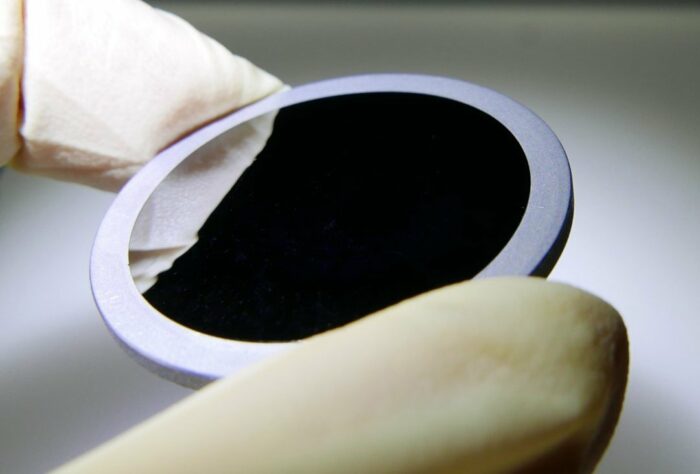
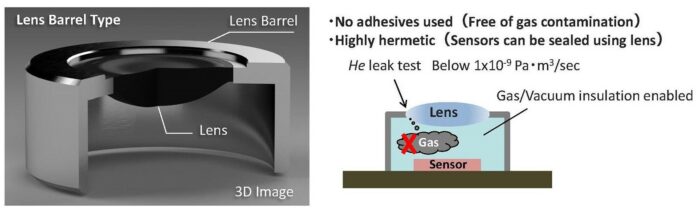
Panasonic has developed a mass production technology of low-cost far-IR aspherical lenses. These lenses are made of chalcogenide glass having excellent transmission characteristics in the far-IR. In addition to realizing low-cost (approx. half compared to the company’s conventional method) by newly developed glass molding method and mold processing technology, Panasonic is now able to offer a variety of lenses such as diffractive lens, the world’s first* highly hermetic frame-integrated lens without using adhesive (leak detection accuracy of less than 1×10⁻⁹ Pa・m3/sec in helium leak test).

A low-cost silicon that has been commonly used as the lens material for far-IR sensors is not suitable for high pixel counts due to its low transmittance, so germanium spherical lenses having high transmittance are widely used as the number of pixels increases. However, as the pixel count increases further, the effect of aberration caused by a spherical lens becomes more pronounced. To reduce this effect, combination of many spherical lenses and an aspherical lens will be required, which leads to increase in cost and size.

To resolve this problem, Panasonic has developed a new technology for the low-cost production of high-performance aspherical lenses suitable for far-infrared optical systems, based on the glass molding technology the company cultivated through the production of visible light aspherical lenses for cameras.

Hermetic sealing is important for thermal imaging camera modules. A low cost lens solution makes thermal cameras more accessible to general consumer applications.
Topaz released the new Gigapixel v6.0.0

Topaz released the new Gigapixel AI (more info here). You save 15% on it using our checkout code “RUMOR“. P.S.: Til April 15 you save $30 on Topaz Denoise (Click here) if you add our checkout code “RUMOR“.

Here are the new features and fixes:

Special Update Instructions

  • This version of Gigapixel AI requires MacOS 10.14 or Windows 10 (or higher). It is not supported on MacOS 10.13 or Windows 7/8.
  • If you use Gigapixel AI as a plugin to Photoshop or Lightroom Classic on Mac, once you install this update, please do the following:
  1. Quit Photoshop and/or Lightroom Classic completely
  2. Gigapixel AI should open by itself after installing the update. Your plugin configurations should now be reset. Follow any prompts displayed relating to installing plugins.

Major Changes

  • Native Apple M1 support
  • Drag and drop DMG installer for mac
  • Updated visual theme
  • Batch model downloading option

Improvements

  • Reduced Very compressed model pixel shift
  • Reduced GPU memory usage when face refinement enabled
  • Reduced installer size
  • Allowed expanding file list to show >3 files
  • Cleaner edges on transparent images

Fixes

  • Fixed preserve source format using TIFF for some JPEGs
  • Fixed black lines in output at certain sizes
  • Fixed crashes on some hardware combinations
  • Fixed incorrect backend selection on Windows 11
  • Fixed face refinement not working on machines with old GPUs
  • Fixed process failing silently if face detection model not present
  • Improved wording of various dialogs and tooltips
  • Fixed long file names overlapping other text
  • Fixed time measurement displayed in file list
  • Fixed batch processing handling images out of order
  • Fixed custom crop tool aspect ratio ignored
  • Fixed “Save As” file suffixes not matching batch mode
  • Fixed certain JPEGs showing 0x0 dimensions
  • Stopped model downloads cancelling each other
  • Require model downloads (fixes many hardware compatibility issues)
  • Fixed photoshop plugin crashing on mac
  • Fixed auto parameter calculation in plugin mode
  • Fixed some cases of exiting without output when used as plugin
  • Prompt for plugin installation when photoshop detected

Known Issues

  • Crash reporter shows up after closing app
  • White flashes when resizing window