



New Panasonic APP for the FX90. A small step today, a big step into the future?

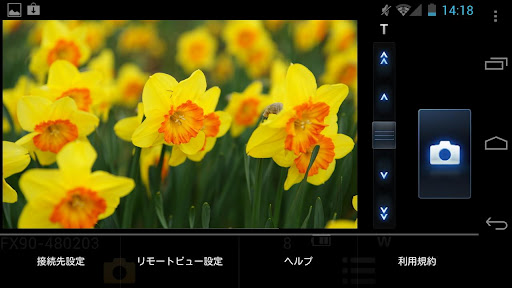
Panasonic just released the new “Lumix Remote” APP for the FX90 (a $240 compact camera). You can find it here on iTunes and here for Android. This is an amazing APP that “allows the Live View screen from LUMIX DMC-FX90 digital cameras equipped with a wireless communication function to be displayed on a smartphone screen, and enables users to perform zoom and shutter operations on the smartphone screen.” Those are the main features:
・ A remote view function that allows users to check the same image as that on the camera’s Live View screen
・ A remote shutter function that allows users to set the zoom level and shoot a still picture
・ A self shot mode function that is useful when shooting a self portrait
This may be a small news today but I really hope Panasonic will “expand” these app to all Micro Four Thirds camera!!!
Something else: A great idea for our mirrorless cameras at Kickstarter.
Via Electronista


Ansel
12 months ago |Especially useful for wildlife photo.
Dummy00001
12 months ago |… but probably would be used mostly for upskirts.
Brian
12 months ago |+1 for the perv-cam.
bbking
12 months ago |I don’t think this app is useful now but in the future it will be. Especially that you can Bluetooth images from your camera to your phone. I guess more and more people will be communicating to and from their phone and camera very soon.
Guest
12 months ago |Bluetooth is too slow, a raw photo from my GX1 is 20mb.
The camera will need good processing power to deliver a small liveview over bluetooth/wireless. It isn’t impossible; we have very small, powerful smart phones.
It could be quite an awesome use of processing power in cameras.
I’d love to be able to control a m43 camera by my phone. It would be like a less retarded version of that detached lens concept camera that was going around the net a year or two ago.
For example; Putting your camera on a tripod and being able to walk in and control a scene would make taking certain studio photos a lot easier. I’m sure there are lots of other applications too.
But something I would really love, would be having a wired connection to a computer. So that I could use a m43 camera as a webcam, or use my computer to control a timelapse. (hopefully with thunderbolt or at least USB 3.0)
Michael Meissner
12 months ago |Hmmm, make your $500-$1k camera into a $30 web cam, and reduce the life time of the shutter by quite a bit.
There are several time lapse systems out there right now, some just doing time lapse, and some offering much more control. I’m not aware of any on a laptop or desktop computer for micro 4/3rds, but doing shutter release is very simple (you need to connect 2 wires to focus, and 3 wires to fire the camera).
Without having the manufacturer provide the software (such as Panasonic seems to be doing for the FX camera), somebody hacking into the camera’s firmware as has been done for some Panasonic cameras, it is problematical. The Canon community has extended the Canon hack (CDHK) to include such things. I believe the Russian doing Panasonic hacks is more interested in video than camera control.
I wish Olympus still did tethered support. I recently tried Studio 2 with my E-5 and it was ok, but Olympus really needs the video to come on the USB, rather that having to have a separate video in interface. I suspect the problem with tethering on Olympus, is Olympus’ inability to actually promote and explain some of the neat features in their products, and then they look around and nobody is using it.
Anentropic
12 months ago |“reduce the life time of the shutter” …how exactly? these cameras all have video shooting mode already
Michael Meissner
12 months ago |I believe without the cameras having a global electronic shutter, they operate via opening and closing the shutter 30 or 60 times a second. Consumer point & shoot cameras operate this way, but I don’t believe the micro 4/3rds have it. If memory serves, the Nikon V1/J1 have limited electronic shutters.
Xsvpro
12 months ago |Sorry, do you actually mean the mechanical shutter moves 30/60 per second? If so then I can reassure you that a web cam application will not reduce shutter life in anyway as the mechanical shutter doesn’t move during video, your looking at Sony F35/65 for mechanical shutters that actually spin in front of the sensor to give global shutter performance and they are over $100K
Andrew
12 months ago |It wouldn’t wear on the shutter any more than video mode does (presumably, hardly at all).
Michael Meissner
12 months ago |Perhaps it doesn’t wear out the shutter, but if you try to make it into a web cam, you get only a couple of hours of run time before your battery is drained. On some of the cameras, you may get overheating if the camera is running continuously (I think I’ve gotten the overheating message from both E-P2 and E-3 when I’m using the camera a lot). In the live view mode, Olympus doesn’t pass sound. So, I stand by my original post, if you want a web-cam, buy something designed for it.
JimD
12 months ago |So after 27.7 mins of video you have done your 100,000 shutter activations?
rubits
12 months ago |No, the video shutter on Panasonic camera’s isn’t global, but it’s also not mechanical. It’s an electronic shutter with no curtain, that scan’s particular pixels then other pixels, only very quickly, in rows. This is why a lot of people are trying to use the hacked GH2 for timelapse videos in video mode. It works pretty well, actually. I have left mine rolling for hours at a time in the past, on mjpeg at 2fps with shutter speeds at 1/125 or higher.
Mr. Reeee
12 months ago |Ditching the legacy ports (USB and HDMI) in favor of a single Thunderbolt port would make so much sense. That way you have mass storage, audio, video, network ability and power all from one small jack.
Michael Meissner
12 months ago |On the other hand, look at Olympus consumer cameras. They reduced multiple ports on the camera to one, combining video out, audio out, power, shutter release, and usb to one cable connection (depending on the camera, for example mirrorless cameras don’t charge their batteries via the combination cable). However, Olympus never provided a cable that combines video out and shutter release, and half heartily provided a cable that combined USB and video out for tethering (if you knew that such a cable existed, and you knew where to order it from).
I really disable combined cable ports, UNLESS the manufacturer provides a Y cable that gives you the ability to do multiple things at the same time.
Atle
12 months ago |Yes, that makes so much sense, except that it’s hardly supported by any other devices. A pretty bad idea imho.
Spunjji
12 months ago |Exceedingly useful, imho. Currently I do something similar with eye-fi in order to preview images after I take them. Being able to upload content to the internet with some immediacy is also very useful. This, however, takes it to a whole new level. If they can get it to do image review and rejection as well I would be sold!
Dummy00001
12 months ago |Now that I think about it.
If Oly would provide a similar control app for their cameras (Android please), then I would forgive them the lack of swivel screen on their m43 cameras. Because, realistically, I need the swivel LCD probably 2-3 times a year for a shot from unusual angle. With such app, to me swivel LCD would be an overkill to have at all other times.
Michael Meissner
12 months ago |For about $70 on ebay you can get a remote video and shutter release device that plugs into all Olympus Pens and OM-D’s except for the E-PL1:
http://www.hkyongnuo.com/e-detail.php?ID=242
Here is my review on dpreview:
http://forums.dpreview.com/forums/read.asp?forum=1008&message=39307970
Dummy00001
12 months ago |Thanks! Bookmarked! That’s definitely interesting topic to keep an eye on.
Though, I would rather not have an extra device with me – and wired at that – when mobile phone can serve the purpose too. And that is major part why to me an iOS/Android app would be a good replacement for the swivel LCD.
P.S. Last comment in the thread about VR goggles reeks SciFi. Ingenious idea.
Michael Meissner
12 months ago |Sure, I agree with you, and wireless would be even better. I was just pointing out that such devices already exist.
There are such devices that control high end Canon and Nikon cameras on phones (for example the DslrRC, DSLR controller, and Helicon apps), but if you want to use micro 4/3rds your options are more limited.
Michael Meissner
12 months ago |Yes, I’ve been wanting to do a heads up display for the camera with shutter release for about 2-3 years now. The various pieces exists, but it is typically too expensive for my tastes (the usual heads up display runs in the thousands of dollars, and even VR glasses are several hundred). Other cameras have better tethering, but Olympus removed the poor implementation of tethering that it did support. It is frustrating.
In case you are wondering, I’m involved with steampunk, which is an attempt at marrying the sensibilities of the past with modern gear. Typically steampunk is Victorian and Edwardian England before World War I, but I tend to be more Dieselpunk, which is more 30′s and noir. I have a steampunk camera that keeps getting more elaborate. One of the things I do, is have stuffed animal mascots on the camera. One of the mascots is a painter squirrel, and I often times do video out to a small LCD, so that it looks like the squirrel is painting the picture. Here are images from last year:
http://www.the-meissners.org/2011-small-albums/2011-hide-camera/small/2011-09-18-18-30-057-hidecamera.jpg
http://www.the-meissners.org/2011-small-albums/2011-hide-camera/small/2011-09-18-18-31-059-hidecamera.jpg
http://www.the-meissners.org/2011-small-albums/2011-hide-camera/small/2011-09-18-18-32-060-hidecamera.jpg
Michael Meissner
12 months ago |I forgot to mention, there is a free Android based app (DSLR remote) that does shutter release, but you need to make your own cables. It can use bluetooth headphone attachments for wireless support. Note, DSLR remote is shutter release only, and does not do video.
Michael Meissner
12 months ago |I wonder whether the penpal accessory would do what you want (for at least review), but since it only provides reduced size images, it may not be as useful.
dzv
12 months ago |If it’s running over 2.4Ghz WiFi, that means the Depth of Field will be increased by a factor of 2.4. Why would anybody want that?? And if it runs over 5Ghz WiFi… Well, you get the picture. No thanks.
Jesper
12 months ago |http://i0.kym-cdn.com/entries/icons/original/000/009/832/dafuq-did-i-just-read-meme.jpg
Guest
12 months ago |He’s making a joke. Because people always stupidly complain about DoF on this website without understanding it.
This is satire.
cybervand
12 months ago |Wha???????….you do not understand anything about wireless technologies, do you ….sorry but what you just wrote was insane!
Bimbo
12 months ago |The frequency is the cropped but the amplitude is the same regardless of format!
JimD
12 months ago |That’s only if you use MFM but he was talking SSB. So its multiply by the antenna length and divide by the wire lead length, unless its wireless then its…….
Dummy00001
12 months ago |Man, that’s why we have a dual band Wi-Fi this days. It halves everything AND double the absolute amount of light gathered, relatively to the surface of the Wi-Fi covered area! It’s not like Full Frame – it’s like a true Fuller Frame!!
dzv
12 months ago |But using dual band on your smartphone will halve your battery time. You could compensate by stopping your lens down an extra 2 stops for longer battery life, but then you effectively still have a 2-stop disadvantage
ljmac
12 months ago |It’s not APP – its just App. Capitalising it makes it look like an acronym, which it isn’t – it’s just an abbreviation of application.
Martin
12 months ago |Remote controls, be it cable releases, wireless releases, or more comprehensive controls, for cameras have always been useful. This one, adding a full-fledged viewfinder to a comprehensive remote control, would thus be exceedingly useful.
Michael Meissner
12 months ago |I’ve been fascinated by shutter releases, remote video, and controls.
There have been remote view and shutter release available for Olympus, Canon, Nikon, etc. for about 2-3 years now (except for the E-PL1). I happen to have a wired version from Yongnuo, and there are wired/wireless versions from Apature and Phottix among others. I also have come up with my own cabling to allow my E-5 to be controlled. However in terms of Olympus, they are only video and shutter release, and not full tethered support. Unfortunately, Olympus seems to have dropped tethering when they moved from classic 4/3rds to micro 4/3rds.
I used it in my Halloween pumpkin camera:
http://www.the-meissners.org/2011-small-albums/2011-hide-camera/small/2011-10-27-10-09-077-hidehallow.jpg
In terms of wireless controls, Samsung has had their SH100 for about a year that is controlled by Samsung android phones. I was bummed when I found out that my LG android phone didn’t have the ability to run the control software.
One thing that is a problem for most of the micro 4/3rds lenses is control of zooming. In theory, since the controls are fly by wire, smart tether control could zoom the lenses without mechanical movement.
I’ve been thinking for my steampunk camera to eventually go more remote control, and have servos controlled by an Arduino to zoom the lens.
luke
12 months ago |tethering will be more usefull, i dont get why nobody add tethering on m4/3
If u work in studio tethering is very important
Jesper
12 months ago |Maybe m4/3 aren’t designed with studio photography in mind?
Guest
12 months ago |Yeah, m43 is all about being portable. If you’re in a studio, you might as well use a bigger DSLR or medium format camera.
m43 makes a small compromise of quality for a LOT of portability and price.
It makes no sense to use m43 in the studio if you’re a professional.
Which is why m43 unfortunately doesn’t have professional studio support for tethering etc. =(
I hope they eventually add it.. but I understand why there is very little point in adding it (besides the fact that us enthusiasts like to dabble in everything and would love to play with such tools)
Miroslav
12 months ago |Interesting, very nice. This is the answer to all those that are afraid of instability of apps – have a remote device that has apps and camera with some kind of wireless communication ability.
Mr. Reeee
12 months ago |External control apps make FAR more sense for photography, than trying to shoehorn some version of Photoshop, Lightroom, or Photogene into a camera.
The issue is as much about battery life and needless complexity as it is about stability. There are already FAR better tools available elsewhere than you’ll ever find in a camera. And there’s already waaaay too much crap stuffed into today’s cameras!
I framed out a wall, with 2 doorways, using just a power jigsaw once upon a time. Sure, I managed to do it, but it took 3x as long and what a pain in the ass!
There’s an old carpenters’ saying: Use the right tool for the right job.
shade
12 months ago |Who said I would use it to connect to my own camera? ^^
Thevoiceoverman
12 months ago |A nice idea for sure. Can you imagine staff demonstrating this in shops? Instant sale.
Dummy00001
12 months ago |Olympus’ response:
http://www.engadget.com/2012/05/29/olympus-creates-worlds-thinnest-industrial-videoscope-packs-hdr/
YouDidntDidYou
12 months ago |@Dummy00001
nice find, industrial videoscopes looks like a good market for Olympus to expand into….
along with reports that Woodford will settle out of court for £10 million (he’s admitted he’s unemployable as a CEO for any company) but he is unwilling to accept a clause not to talk about the financial affair…
Mr. Reeee
12 months ago |Has he sold the movie rights yet?
(PS: that’s not a joke)
Thevoiceoverman
12 months ago |Also, the world’s most expensive baby monitor.
bli
12 months ago |There is a French “toy” helicopter (€500?) which can be remotely controlled by an iPhone/App and wi-fi (I believe). I think it has two cameras which can be viewed on the iPhone — probably in low resolution. For remote control, “low” resolution may be better than nothing — for wildlife photos, crossfiring during a wedding ceremony, etc.
Michael Meissner
12 months ago |You can buy transmitters and receivers that transmit video over wifi, and there are wireless video and shutter release setups for Olympus from Apature and Phottix (among others) that export both video and shutter release wirelessly. The Draganflyer helicopters have featured a Pen in the videos for their X6 line, and the X8 line now has more power and can lift larger loads.
HifiNut
12 months ago |You also can try an apps in iphone called triggertrap. It is a time-lapsed shutter released that works with a number of cameras.
Mr. Reeee
12 months ago |Now that is cool!
$10 for an iPhone/iPad dongle:
https://triggertrap.com/shop/triggertrap-dongle/
$10 for a cable for the GH2 and Panasonic M4/3 cameras:
https://triggertrap.com/shop/cl-l1/
$10 for the app.
dzv
12 months ago |I got my TriggerTrap dongle and cable yesterday. I’ve just tried the free version of the app so far. Works pretty well, but the app seems a little buggy right now. After changing settings, sometimes the shutter release stops working, but after changing/saving a couple of times, it starts working again. Should be easily fixable in the software, though.
Thevoiceoverman
12 months ago |Mine came today. Gonna try it this week.
Michael Meissner
12 months ago |Note, triggertrap is shutter release only. It doesn’t do video out, or other functions used in full tethering. I am still waiting for the V1 unit that I ordered last summer (the iphone/ipad version is shipping now, but given I have an Android phone, it isn’t useful to me).
ssgreenley
12 months ago |Am I the only one who noticed that Kickstarter link on the bottom? I’d be reeeaaal hesitant to keep a huge magnet right by all the electronics in my camera, lenses, and SD cards…
JimD
12 months ago |I thought the same but the e-m5 is magnetically sealed as its IBIS is a magnetic system. Still would not use it.
If the magnet is that strong every time a bus goes by you would move sideways on the foot path if it was in your pocket.
You could follow a bus using a couple of these if you had roller skates. Freebe trip and no contact.
Gabriel
12 months ago |Samsung do this with their newest line of mirrorless NX camera too. I tink it’s the future, maybe one day Canon and Nikon put this feature in the camera, and not as a overpriced external unit
Henrik
12 months ago |I long since wanted a remote live view monitor as a natural improvement of a side-hinging articulated monitor. For me, the monitor could be Panasonic-exclusive and with cable connection; i know there is an OEM remote monitor for Canon cams, connected via HDMI, getting bad reviews. Ultimately, that remote monitor should be glasses, or just one glass to wear on your eye. I’d very much prefer a few hard buttons on the side of the remote monitor to touching around the image.
Michael Meissner
12 months ago |Yep. If Olympus provided an extension cable for the accessory port, you could use a VF-2. I would really like that. I bought some video glasses to try and use, but so far, I haven’t been able to get the cabling right. There are such systems on the market, but so far, the price point is higher than I want to pay.
In goggling around, I found a company advertising for somebody to reverse engineer the VF-2 interface.
In terms of just remote video (and not shutter release), I’ve used a JXD 696 mp4 player which does video in as a remote monitor before I got the Yongnuo. Like the Yongnuo, it uses standard Nokia 5C batteries.
Note, Olympus does not do live view via HDMI, and it immediately switches to playback mode when you plug in an HDMI cable. If you plug in an analog video cable, it shuts off display of the back LCD, and displays instead on the remote montior. It displays at QVGA level (320×240), so your remote device must be able to use that resolution.
Esa Tuunanen
12 months ago |Olympus used to have very good tethered shooting interface in their compacts and one group of hobbyers have used those older Olympus compacts to take now over eight million photos for time lapse videos. (one camera took over million shots)
http://www.karhukamera.com/index.php?&lan=en
They have this kind of videos from all of those pictures:
http://www.karhukamera.com/item.php?item=9006478
Obviously as actually usefull feature Olympus has replaced tethered shooting with more fashionable art filter crap and such.
Michael Meissner
12 months ago |Yes. I could even control my C-2100UZ with open source software on my Linux system, since the cameras of that era used the standard PTP (picture transfer protocol).
Unfortunately, by the time Olympus went to the DSLRs, they changed to use a proprietary protocol, and started charging for the software (Studio) to use it. Furthermore, while they included a trial version of Studio with the E-1, I don’t believe they enabled the use of it in the trial software.
When the E-330 came out with live view, they did not export the video to the computer over the USB link, and instead you needed to use a splitter cable that did video out and usb and then feed the video back into the computer via an extra cost frame grabber or TV input card.
I get the sense that nobody really understood the power of tethering, presumably the one person who understood in the C-* camera era got laid off. And they certainly did not know how to promote it.
JimD
12 months ago |Did you see the ghost at 47 seconds?
That’s a lot of shutter time there.
michele
12 months ago |what does Panasonic and Olympus expect to release apps&software to tethered their m43 cameras ?????
Esa Tuunanen
12 months ago |This is what should be extended instead of cramming camera full of buggy software.
Though wired tethering should be also available instead of just wireless.
(wire can give higher data bandwidth without need for high transmission power requirements and avoids conflicts when there’s lots of wireless stuff around)
Mr. Reeee
12 months ago |+10 It also extends already too-short battery life.
Jo
12 months ago |The amazon review on that cam is brutal. The app sounds cool.
わからない
12 months ago |I’m all for it, mainly for landscape photographhy. Preview on ipad would be much easier for composition than staring at the EVF or LCD.
Rob
12 months ago |Great idea. This is something where the traditional optical companies will get left behind (including Oly) if they don’t get their act together. Samsung are already on it and I’m sure Sony isn’t far behind too.
Canikon will keep up in a few years time probably.